SetForge leads the training plan, MeetForge runs meet day on Mac

SetForge generates the workout.

Structured, pace-based sets in seconds — then run them on a built-in pace clock. Not a template library; a workout engine.

SetForge
Generates structured workouts + pace clock
MeetForge
Run meets end to end on Mac
For Teams + Individuals
Coaches, officials, masters, triathletes
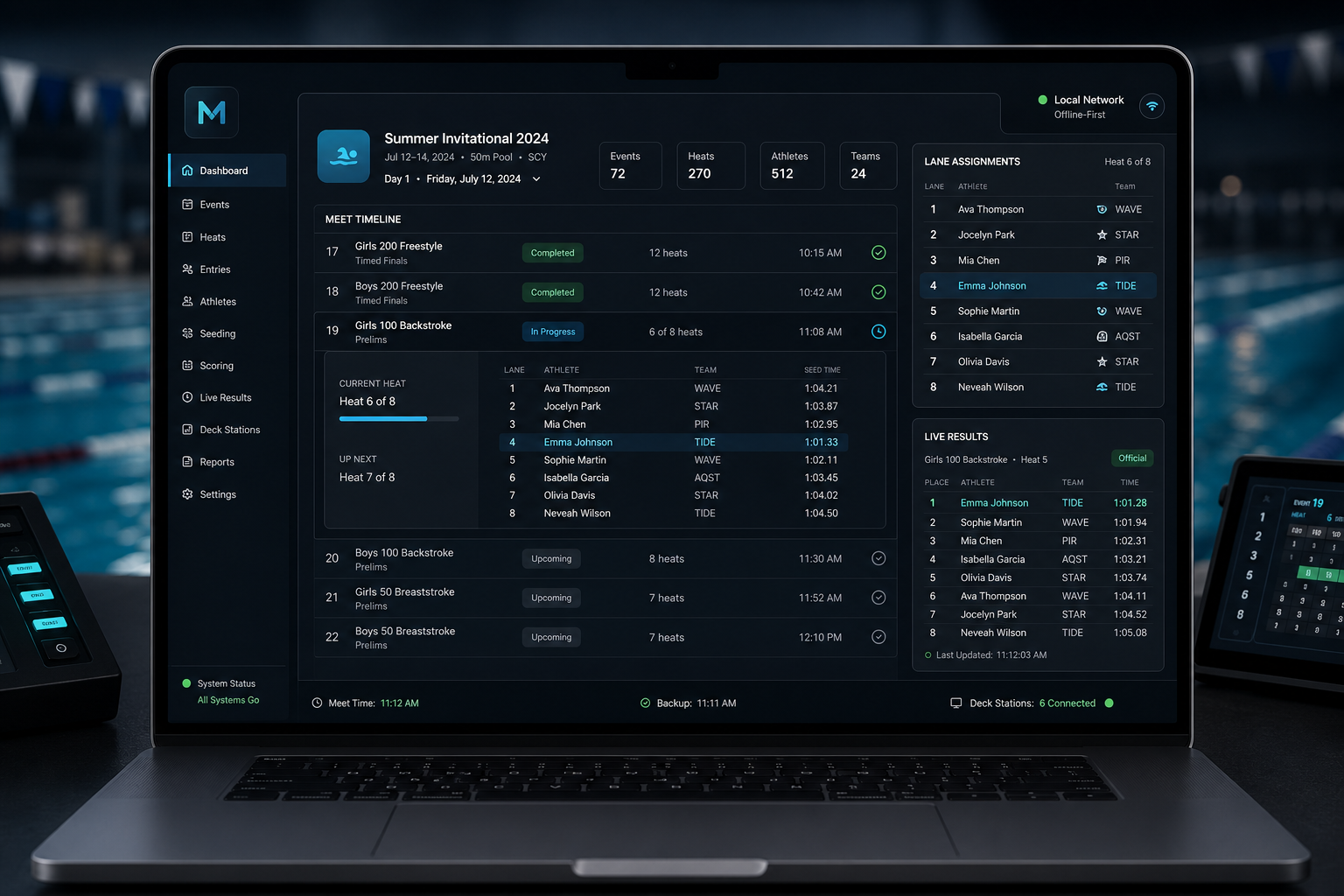
MeetForge macOS dashboard showing meet timeline, event seeding, lane assignments, and live results panels in a dark interface
SetForge training plans stay aligned with meet operations in MeetForge.

SetForge

Structured workouts, paced and ready to run.

SetForge generates complete practices from warmup to cooldown. Choose the workout type, yardage, and pace goals, then run it poolside with pace-aware intervals, lane-by-lane outputs, and deck-ready tools designed for real meet-week training.

Workout engine Generate + run

Generate fast, pace-aware practices

  • Generate instantly: pick type, yardage, and pace to get a full warmup-to-cooldown practice.
  • Pace-aware intervals auto-scale every send-off to each swimmer’s target pace.
  • Multi-lane generate produces one workout with each lane on its own pace, printed side by side.
  • Run mode includes a poolside pace clock, split logging, audio cues, and a giant deck display with AirPlay.
Team operations Coach tools

Track progress and organize every lane

  • Track progress with saved history, personal records for SCY/SCM/LCM, and an 80/20 intensity dashboard.
  • Organize your team with groups, lanes, managed-swimmer rosters, and private coach notes.
  • Bulk CSV import for managed-swimmer rosters plus attendance and roll-call tracking.
  • Subscribable team calendar (.ics) and reports for programming mix, schedule adherence, and parent recap.
  • SafeSport and background-check compliance tracking keeps staff up to date.

SetForge generates workouts and keeps daily training operations organized.

See why programs switch

Offline-first architecture

Run the meet on your local network without an internet connection.

MeetForge runs locally on Mac and serves deck stations and live results over the pool’s LAN. If Wi‑Fi is busy or cell service drops, meet operations continue without relying on cloud access.

SetForge (iOS) works offline too — your latest workouts stay cached on deck with no signal, plus “Hey Siri” quick-generate and Apple Watch swim import.

Local‑network operation, end to end

  • Seeding, scoring, and edits are managed on the local machine with immediate updates.
  • Live results and phone deck stations are served over LAN rather than the public web.
  • No required logins or cloud sync steps during the meet.

Live Results & Poolside Operations

Serve results in real time without the cloud.

MeetForge broadcasts results across your pool’s local network, so coaches, officials, and spectators get updates even when the venue Wi‑Fi is unreliable. Deck stations run on phones or tablets, keeping heat sheets, timers, and event progress in sync with the meet desk.

Local-network live results

Publish standings, splits, and scores directly from the meet desk to any device on the same network. Results refresh across connected devices without leaving the pool deck.

Phone-based deck stations

Officials can check heat sheets, lane assignments, and event status from a phone or tablet. No extra laptops or cables required.

Fast updates for every role

Coaches see live scoring, timers confirm the next heat, and spectators follow results from the bleachers. Everyone stays aligned with the meet’s real-time flow.

Who it’s for

Two Mac-native tools for meet operations and structured swim training.

MeetForge runs meets end to end for directors, administrators, and deck crews. SetForge is built for coaches and self-coached swimmers who need repeatable, data-ready training sets. Many programs use both to manage meets and streamline practice planning.

Meet directors & administrators
Best served by MeetForge for seeding, scoring, and live results across duals, invitationals, and championships.
Coaches & team staff
Use SetForge for structured sets and seasonal planning, and MeetForge when your program runs meets.
Self-coached adults & masters swimmers
SetForge delivers repeatable, trackable swim training without the overhead of meet management.

Masters, club & high-school programs

SetForge organizes daily training sets, while MeetForge supports the meets your teams host or attend.

Overlap: training + meets

Lesson & developmental programs

SetForge keeps skill-progressive sets consistent across coaches and sites.

SetForge focus

Meet hosting organizations

MeetForge runs seeding, scoring, and local-network results for reliable deck operations.

MeetForge focus

Triathletes & solo swimmers

SetForge provides structured swim training blocks without requiring meet software.

SetForge focus

Masters & triathletes

SetForge speaks Critical Swim Speed with CSS-based pacing, open-water sets, a race calendar that auto-periodizes training, and TrainingPeaks-ready workout export.

SetForge focus

Lesson & learn-to-swim programs

Skill-progressive youth content, per-swimmer equipment profiles, and parent recap exports keep instruction consistent across coaches.

SetForge focus

SetForge for endurance

Built for triathletes and masters swimmers

Entering a 400 + 200 time trial lets SetForge compute Critical Swim Speed, then pace every set to CSS zones for consistent, repeatable intensity. Add a race calendar and SetForge periodizes automatically toward the next A-race with base, build, peak, and taper phases. It can also generate open-water skill sets, and every workout can be exported in a TrainingPeaks-ready format for use in your training log.

CSS-based pacing

Critical Swim Speed is calculated from a 400 + 200 time trial, then every set is paced to CSS zones for clear intensity control.

Race-aware periodization

Add a calendar of races and SetForge builds base, build, peak, and taper phases toward your next A-race.

Open-water skill sets

Dedicated open-water sessions cover sighting, drafting, and pacing skills for triathlon and long-course days.

TrainingPeaks-ready export

Every workout exports in a TrainingPeaks-ready format so you can log sessions and keep a complete training history.

Why teams switch

Trust signals from the people who run meets

These are the most common decision criteria we hear when programs move to MeetForge. Short, role-attributed notes keep the focus on operational outcomes rather than hype.

Mac-native Offline-first Poolside ready

Every statement below is phrased as a practical need, not a manufactured quote. It’s how teams compare software when a meet is on the line.

“We needed a Mac-first workflow that feels modern and fast, not a port from another platform.”

Head Coach Program using dual & invitational meets

“I want deck stations, check-in, and results to run locally without worrying about Wi‑Fi.”

Meet Director Regional championships

“Imports from Lenex, SDIF, and HY3 have to be dependable or the whole timeline slips.”

Operations Admin Multi-team invitational

“We track every heat and score quickly; the software should never slow the officials down.”

Head Official Summer league finals

Ready to compare workflows? See how MeetForge runs an entire meet on macOS.

FAQ

Clear answers on MeetForge and SetForge

Practical guidance on what each tool does, who they help, and how they work together across a full swimming program.

What is MeetForge for?

MeetForge runs the meet itself: import entries, seed heats, manage scoring, and publish live results on a Mac.

What is SetForge?

SetForge generates structured swim workouts with pace-scaled intervals, then lets you run them on a built-in pace clock and track every swimmer's progress. Coaches build for a whole team, group, or lane — including multi-lane sets where each lane swims at its own pace. It replaces spreadsheets, paper sets, and manual interval math.

Who does MeetForge help most?

Meet directors, administrators, and timing crews running duals, invitationals, or championships who need fast meet operations.

Is SetForge built for coaches and swimmers?

Yes. Coaches use SetForge to plan and deliver practices; swimmers receive clear, structured sets from their coach.

How do SetForge and MeetForge work together?

SetForge runs day-to-day training; MeetForge runs competition day. SetForge supports race-pace anchoring so each main set ties to a swimmer's goal time for a specific event, while periodization and taper planning can be built from the season goals you define. One system, from Tuesday's practice to Saturday's final.

Do they replace older meet tools?

MeetForge is a modern Mac-native alternative to Windows-first meet managers, while SetForge replaces spreadsheets and paper sets.

SetForge close

Run every training session with pace-aware sets, deck-ready views, and team-wide progress tracking.

SetForge keeps daily practices organized with swim-ready set sheets, lane organization, and real-time completion notes so the whole staff stays aligned.

Pace-based workout generator On-deck run sheets & timers Progress tracking by swimmer

Explore SetForge

Generate sets from pace targets, sync them to deck stations, and keep every lane on the same plan.

Pair with MeetForge when you need it

Keep meet-day operations in MeetForge and daily training in SetForge so your staff works from one modern Mac-native stack.

SetForge generates pace-based workouts, runs them on-deck, and tracks every swimmer's progress — so coaches spend practice coaching, not writing sets on a whiteboard.

Learn how it works